-
ReviverSoft
Answers
Get Answers from our
Community of Computer Experts-
Home
-
Resources
-
Questions & Answers
- what is the cost of driver update
what is the cost of driver update
 i like this question0 Like ItFollowI am using Windows10 that came with myi computerOperating System:Answer this questionbest answer
 Hi Linda,
If you are asking about the Windows Drivers, then it is free to update them.
Windows Update checks for updated drivers and software for your devices and install them automatically.
Keeping Windows Update on a good way to make sure your devices continues to work properly and you get the best experience with them.
Just follow the below steps:- Swipe in from the right edge of the screen, tap Settings, and then tap Change PC settings.
(If you're using a mouse, point to the lower-right corner of the screen, move the mouse pointer up, click Settings, and then click Change PC settings.) - Tap or click Update and recovery, and then tap or click Windows Update.
- Tap or click Choose how updates get installed.
- Under Important updates, choose Install updates automatically (recommended).

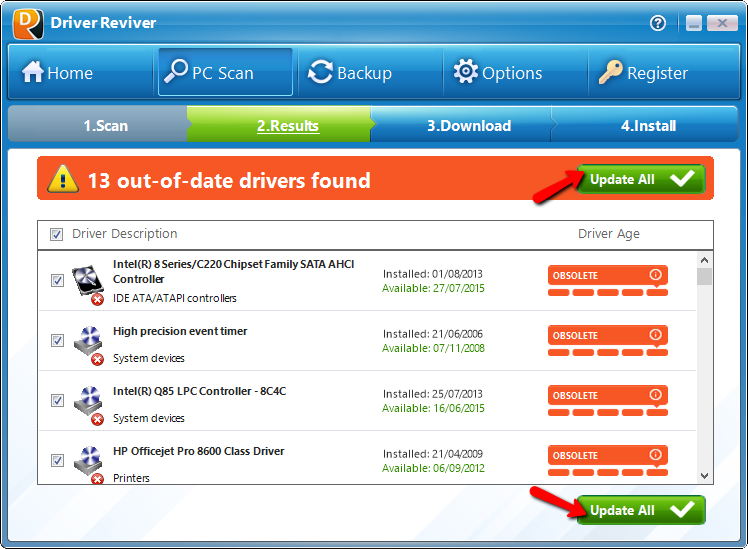
If you are asking to update from Driver Reviver, you can follow the below steps:- Launch Driver Reviver and click the Start Scan Now button to start scanning your PC.
- Wait for the scanning process to complete.
- Review the scan results and click the Update All button to update all outdated drivers on your computer.
- Driver Reviver will now download the updates for your drivers, backup your original drivers and then install the latest updates for your computer drivers. This may take a while depending how many drivers you are updating on your computer and the size of the downloads.
- Once the updates are installed, you will see a quick summary of your drivers and your PC’s status changes to Excellent.
Thanks,
Lokesh
There are no answers yet.
Welcome to Reviversoft Answers
ReviverSoft Answers is a place to ask any question you have about your computer and have it answered by the expert community.Post your question
Ask your question to the community nowSimilar questions
I kept getting the blue screen with Driver Power State Failure error message and then my computer would restart. I found your product and it did not happen any more. I just purchased an anti-virus (kaspersky) and now it is doing it again. It is so frustrating. My computer is only 6 months old. It is a Asus desktop.VIEW ANSWERS8I have had Driver Reviver since Jan 2013 and it just started giving me this error message today on October 6th, 2013.VIEW ANSWERS19Umiddelbart i forbindelse med registreringen 10 minutter efter tilsendelsen af licensnoegle.VIEW ANSWERS5Having trouble with your PC?Complete a free PC scan using Driver Reviver now.DownloadStart Free Scan -
