-
ReviverSoft
Answers
Get Answers from our
Community of Computer Experts-
Home
-
Resources
-
Questions & Answers
- I have a 4 GB RAM, verified with dxdiag.exe, but in the windows task manager in 2953 and it displays the pc is very slow at times
I have a 4 GB RAM, verified with dxdiag.exe, but in the windows task manager in 2953 and it displays the pc is very slow at times
 i like this question0 Like ItFollowa problem I've noticed recently, before everything was normal.
pc type HP Probook 6570bOperating System:Answer this question
0 votes
00Hi Arab,
Open task manager and view the following settings in Performance tab:- View the "Physical Memory" section. The first entry is labeled "Total." This is the total amount of memory installed on the machine. The "Available" label tells you how much memory is available for use. If this number approaches 0, the computer performance is poor. When physical memory is low, the machine requires virtual memory, which is a system where the computer saves information to the hard drive. Virtual memory is much slower than physical memory.
- View the "Commit Charge" section and view the "Total" entry. This shows you how much memory is being used by the software on your machine. The "Peak" entry is the total amount of memory used when software is loaded or high-memory requiring software is run. If this number is above 70 percent of memory usage, you may experience very slow processing time on the computer. More RAM installed on the machine will remedy the issue.
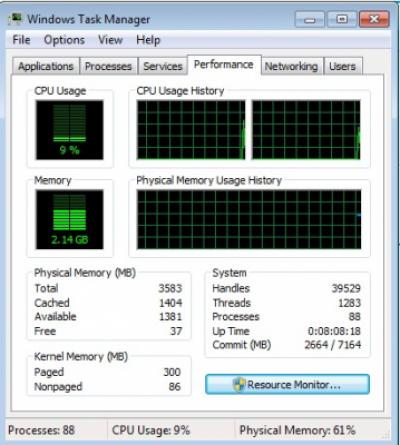
I hope this helps.
Regards,
Lokesh.
0 votes
00Welcome to Reviversoft Answers
ReviverSoft Answers is a place to ask any question you have about your computer and have it answered by the expert community.Post your question
Ask your question to the community nowSimilar questions
When I connect an external microphone to the jack, it is not working. I can see it in the "Sound" tab, but the levels is very low. I have tried with several microphones.VIEW ANSWERS40Started happening about 3 weeks ago at the same time as I had the HD replaced.VIEW ANSWERS19mein pc ist put mochte nun reviversoft auf mein laptop registriren wie geht das und was muß ich tunVIEW ANSWERS19Having trouble with your PC?Complete a free PC scan using Driver Reviver now.DownloadStart Free Scan -

