-
ReviverSoft
Answers
Get Answers from our
Community of Computer Experts-
Home
-
Resources
-
Questions & Answers
- My laptop BSOD's on a regular basis.Someone,PLEASE HELP!
My laptop BSOD's on a regular basis.Someone,PLEASE HELP!
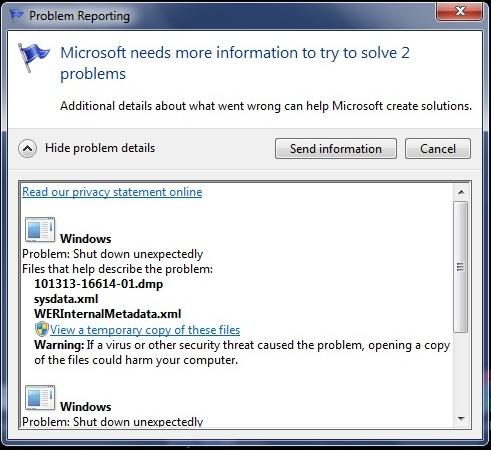
 i like this question0 Like ItFollowThe problem seems to occur at random,sometimes just listening to music,sometimes doing nothing,ie,it's switched on but not doing anything.Please see screenshot.Also,please note,the first figure (i.e.,101913-29780-01.dmp) is always a different one.Operating System:Uploaded files:Answer this questionbest answer
 Hi Chris,
Can you please take a picture with a camera of the actual Blue Screen that you are getting. If we I know the error code it helps to diagnose the problem.
0 votes
00Hi Chris,
PAGE_FAULT_IN_NONPAGED_AREA BSOD (Blue Screen Of Death) error can happen after the installation of an incompatible driver or program , corrupted file system, after the installation of the Platform Update KB2670838 because of a compatibility issue with your currently installed graphic card drivers, etc.
To resolve the PAGE FAULT IN NONPAGED AREA BSOD error, follow the solutions below:
1. Make sure that your computer is clean from viruses, malware, etc.
2. Try to disable your antivirus software and restart your computer.
3. Remove any recently added hardware on your computer and restart your computer to find out if the error recurs.
4. Perform a clean Windows boot to find out if a service or a startup program causes the STOP: 0x00000050 error.
Steps for clean boot are:- Log on to the computer by using an account that has administrator rights.
- Click Start, type msconfig.exe in the Start Search box, and then press Enter to start the System Configuration utility.
Note If you are prompted for an administrator password or for confirmation, you should type the password or provide confirmation. - On the General tab, click the Selective startup option, and then click to clear the Load startup items check box. (The Use Original Boot.ini check box is unavailable.)

- On the Services tab, click to select the Hide all Microsoft services check box, and then click Disable all.

- Click OK, and then click Restart.
5. Check your hard drive for system errors using Chkdsk command.
Steps for doing this are:
Use the check disk commands as follows:
1. Click Start.
2. In search window type 'cmd' and ENTER. Right click and select 'Run as administrator'.
3. Type at the command prompt CHKDSK /P and press ENTER to scan the disk.
4. Then type CHKDSK C: /F /R and press ENTER to repair corrupt sectors, if there are any.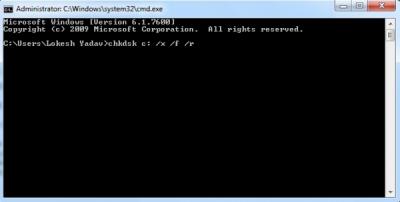
NOTE: The root drive has to be C: and the command may schedule a task at the system startup, if it does, then press Y to schedule a task and restart the computer to perform chkdsk.
Once chkdsk completes, boot to the desktop and then check.
I hope this helps.
Regards,
Lokesh
0 votes
00
0 votes
00Hi Chris, Do you recall making ANY changes/additions to your computer before this started happening? The first thing I\'d recommend is restarting your computer in the Windows Safe Mode (reboot and start tapping the F8 key) and using the Windows System Restore service to restore your computer to an earlier point in time. This should roll back any changes that were made and get your computer back to normal. Of course, including the specific details of the Blue Screen error ( i.e error code ) will help us offer specific solutions. James
Welcome to Reviversoft Answers
ReviverSoft Answers is a place to ask any question you have about your computer and have it answered by the expert community.Post your question
Ask your question to the community nowSimilar questions
When I connect an external microphone to the jack, it is not working. I can see it in the "Sound" tab, but the levels is very low. I have tried with several microphones.VIEW ANSWERS40Started happening about 3 weeks ago at the same time as I had the HD replaced.VIEW ANSWERS19mein pc ist put mochte nun reviversoft auf mein laptop registriren wie geht das und was muß ich tunVIEW ANSWERS19Having trouble with your PC?Complete a free PC scan using Driver Reviver now.DownloadStart Free Scan -


Comments