-
ReviverSoft
Answers
Get Answers from our
Community of Computer Experts-
Home
-
Resources
-
Questions & Answers
- because I can not use HDMI audio windows 10 to be in use
because I can not use HDMI audio windows 10 to be in use
 i like this question0 Like ItFollown & atilde; the only problem I n & atilde, the be working audio hdmiOperating System:Answer this question
0 votes
00Hi Jose,
You can follow the below methods and check if it helps:
Method 1: By default Windows does not route sound over the HDMI output. To change this we need to change the settings in control panel.
Note: This will turn off sound from the speakers or normal audio output on the laptop. To get that back you will have to reverse this process.- Press Windows key + X
- Click on "Control Panel"
- With the Control Panel in "Control Panel Home" view please click on "Hardware and Sound"
- Where it says "Sound" in green letters there are three options below that are in blue click on "Manage Audio Devices"
- This will bring up a window labeled "Sound"
- On the "Playback" tab there is listed the sound options available to you. One should read "Digital Output Device (HDMI)" Click on that.
- There should now be a check mark on that option, make HDMI sound output as default .
- The Sound should then play through your HDMI hookups to the TV.
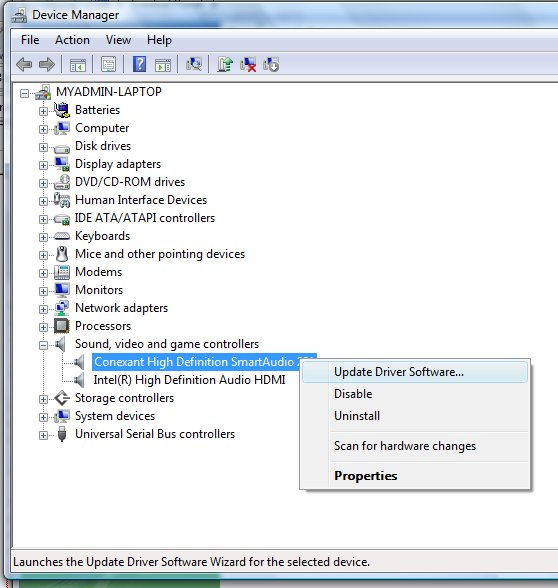
Method 2: Update the Sound driver- Press Windows key + X key when you are at desktop.
- Select Device Manager.
- Double-click Sound driver from the left panel to Update.
- Right-click the device, and click Update driver Software
- Windows will prompt you to confirm the device’s removal. Click OK to remove the driver.
- Then reboot your computer and it should work fine.
Regards,
Lokesh
0 votes
00Hi Jose,
I'm sorry to hear about the problem you are facing and I look forward to help you.
However, we need a little more information to be able to help you. Could you please provide specific details of the problem?
Problem images would also be useful.
I hope to hear answers from you soon.
Regards,
Christian
Welcome to Reviversoft Answers
ReviverSoft Answers is a place to ask any question you have about your computer and have it answered by the expert community.Post your question
Ask your question to the community nowSimilar questions
When I connect an external microphone to the jack, it is not working. I can see it in the "Sound" tab, but the levels is very low. I have tried with several microphones.VIEW ANSWERS40Started happening about 3 weeks ago at the same time as I had the HD replaced.VIEW ANSWERS19mein pc ist put mochte nun reviversoft auf mein laptop registriren wie geht das und was muß ich tunVIEW ANSWERS19Having trouble with your PC?Complete a free PC scan using Driver Reviver now.DownloadStart Free Scan -

