-
ReviverSoft
Answers
Get Answers from our
Community of Computer Experts-
Home
-
Resources
-
Questions & Answers
- why does my computer have light blue tinted on the screen?
why does my computer have light blue tinted on the screen?
 i like this question0 Like ItFollowThe problem started happening 3 weeks ago after my cooler had broken.Operating System:Answer this questionbest answer
 Hi Sujith,
As this type of problem is generated by CPU, so i would suggest you to check your BIOS settings and resert them to default setings.
It might be the case that incorrect voltage is supplied to CPU.
Follow the below steps:
1.Reset the BIOS to default setting or update it.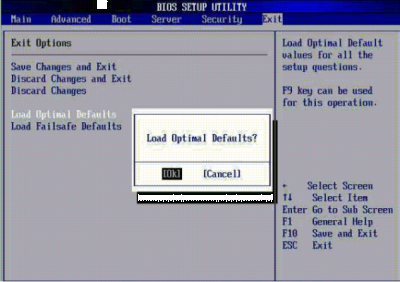
2. Sometimes it is an indication that the Power supply is out of its voltage range.
Perform this check on your computer:
Check the system clock and see if its set correctly or not. Sometimes you get this error when the battery backup of motherboard has failed.
(If system clock is correct, then your battery is OK).
Thanks
Lokesh
There are no answers yet.
Welcome to Reviversoft Answers
ReviverSoft Answers is a place to ask any question you have about your computer and have it answered by the expert community.Post your question
Ask your question to the community nowSimilar questions
When I connect an external microphone to the jack, it is not working. I can see it in the "Sound" tab, but the levels is very low. I have tried with several microphones.VIEW ANSWERS40Started happening about 3 weeks ago at the same time as I had the HD replaced.VIEW ANSWERS19mein pc ist put mochte nun reviversoft auf mein laptop registriren wie geht das und was muß ich tunVIEW ANSWERS19Having trouble with your PC?Complete a free PC scan using Driver Reviver now.DownloadStart Free Scan -
