-
ReviverSoft
Answers
Get Answers from our
Community of Computer Experts-
Home
-
Resources
-
Questions & Answers
- "Back-up removal unsuccessful" keeps coming up. Why & what?
"Back-up removal unsuccessful" keeps coming up. Why & what?
 i like this question0 Like ItFollowcomes up today when running Maintenance tasks, again & again. Operating apparently not progressing beyond 1/2 bar. Also cant cancel all tasks.
"Back-up removal unsuccessful" was coming up constantly last night doing "free space cleaning". I have not been able to complete free space cleaning even at lowest setting.
MacReviver appears to be frozen.Operating System:Answer this questionbest answer Hi Mike,
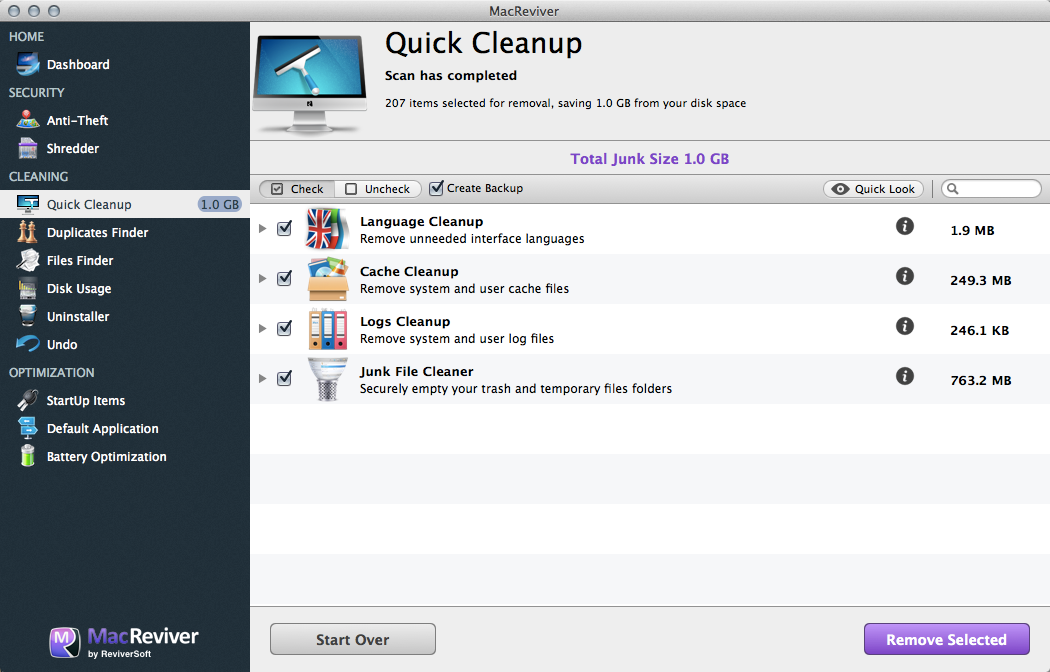
Quick Cleanup is a set of four tools to easily gain back lost drive space on your Mac.
To use Quick Cleanup:- Launch MacReviver.
- Click Quick Cleanup.
- Click Start Scan.
- MacReviver will now scan the different areas of your Mac.
- You should then see the Cleanup scan results for your Mac. Note the Total Junk Size that you’ll be recovering.
- Click Remove Selected to clean the selected areas of your Mac.
If you are still facing any issue, I would suggest you to send an email to support@reviversoft.com for further assistance regarding your concern.
A technical representative will help you out in a timely manner.
Please don't forget to include your account details.
Regards,
Lokesh
There are no answers yet.
Welcome to Reviversoft Answers
ReviverSoft Answers is a place to ask any question you have about your computer and have it answered by the expert community.Post your question
Ask your question to the community nowSimilar questions
Started happening about 3 weeks ago at the same time as I had the HD replaced.VIEW ANSWERS19I have had Driver Reviver since Jan 2013 and it just started giving me this error message today on October 6th, 2013.VIEW ANSWERS19Having trouble with your PC?Complete a free PC scan using Driver Reviver now.DownloadStart Free Scan -
