-
ReviverSoft
Answers
Get Answers from our
Community of Computer Experts-
Home
-
Resources
-
Questions & Answers
- Driver Reviver was shown to be free utility software on Softonic.com, then why you charging me to use it.
Driver Reviver was shown to be free utility software on Softonic.com, then why you charging me to use it.
 i like this question0 Like ItFollowI am confused on seeing this as free and safe download software on Softonic.com
Version is 5.0.1 and I downloaded it from Softonic.com.
Was it some other software. Also, my drivers are mostly HP drivers, will it update them regularly.Operating System:Answer this question
0 votes
00Hi Laurens,
PC Reviver is a tool which helps you to identify problems found in your PC and repair them. It is a multi-purpose utility that will diagnose errors on your PC, safely repair them, and provide other maintenance and optimization recommendations.
You can try the free, trial version of PC Reviver and use it but for limited functionality only. PC Reviver is offered as a feature limited trial. Some of the functions of PC Reviver can be uses 100% for free in the trial while other features are unlocked when you purchase a license to use PC Reviver.
You can only use the features are which are present in the free trial, for using more features you need to unlock them by buying the product. You will need to purchase a license code for PC Reviver to be able to fix all the issues.
If you want to improve your PC performance without spending any bucks, you can use the below methods as well.
Method 1: Keep updating Windows
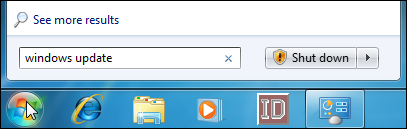
To access Windows Updates, just hit Start, type “Windows Update,” and then hit Enter.
Windows Update divides updates into “important” and “optional”. Important updates are selected for download and installation by default. Optional updates are not selected. To control what updates are installed, just click the pertinent link.
The window that opens allows you to select each update you want to install.
If you have updates on the list that you know you won’t ever install and would like to stop seeing them, just right-click one or more updates and then choose “Hide updates” from the context menu.
When you return the main Windows Update window and click the “Install updates” button, all the important and optional updates you’ve selected are downloaded and installed.
Method 2: Keep Third Party Apps Up to Date
Keeping Windows updated is very important, but it doesn’t end there. You want to make sure your other apps are updated as well. Aside from bug fixes and new features, updating your apps ensures that you fix the inevitable security flaws that pop up in common third party apps like Adobe Flash, Java, and so on.
Security software, like antivirus apps, are especially important to keep updated. Most have automatic updaters built in. Still, it’s important to check up on them once in a while–like before you run a manual scan–just to make sure.
I hope this helps in clarfying your doubt.
Regards,
Lokesh
0 votes
00Hello Laurens ,
Thank you for posting your concern's here.
We promote that you are able to receive a "free download" or "free scan" with our software, which is true. I must point out, however, that there is absolutely no misrepresentation of our product as a "freeware" program. We take this stance very seriously, so if you have seen our products listed as a "freeware" product somewhere, please send us a link to the website so we can investigate this more closely and take the appropriate action.
We, at ReviverSoft, do offer a free scan with our software that many software manufacturers do not offer. We sincerely trust that you will see the value in our products, and they are all backed by an unconditional, 30 day money back guarantee. There is absolutely no risk if you really want to try the product.
While it is true that there are other products on the market that offer similar functionality to ReviverSoft for free, we think it's appropriate to only comment on the quality of our products. At ReviverSoft, we take pride in our software and invest heavily in research and development to deliver the best possible products to our customers. We also provide a wealth of professionally produced resources including instructional videos, blogs, newsletters and other materials dedicated to helping our customers get the most from their computers.
We encourage you to try the free scan to check the status of your computer and, if you ever feel like upgrading, then please feel free to come back and visit us at www.ReviverSoft.com.
Sincerely,
Christian
Welcome to Reviversoft Answers
ReviverSoft Answers is a place to ask any question you have about your computer and have it answered by the expert community.Post your question
Ask your question to the community nowSimilar questions
I kept getting the blue screen with Driver Power State Failure error message and then my computer would restart. I found your product and it did not happen any more. I just purchased an anti-virus (kaspersky) and now it is doing it again. It is so frustrating. My computer is only 6 months old. It is a Asus desktop.VIEW ANSWERS8I have had Driver Reviver since Jan 2013 and it just started giving me this error message today on October 6th, 2013.VIEW ANSWERS19Umiddelbart i forbindelse med registreringen 10 minutter efter tilsendelsen af licensnoegle.VIEW ANSWERS5Having trouble with your PC?Complete a free PC scan using Driver Reviver now.DownloadStart Free Scan -