
when i turn on my computer the picture is too big for the screen

Internet

2014/12/05 05:13

by  James Jones

toshiba for windows xp.google crashed after i downloaded a flash drive player that i didn't need & it also came with 6 other program attached the picture it puts out doesn't fit the screen it is far too big and every site i go to i do the best i cxan making it smaller(i had a friend come over very good with computers undid mydamage execpt for the fcct that i ripped the old screen off the laptopm it is now hooked up to a moniter)

Operating System:

Answer this question
Best answer

2014/12/15 15:39

by Nish

Hi James,

Here's what you need to do:

1. Right click on the Desktop and click on "Properties."
2. Click the "Settings" tab
3. Move / slide the bar to the right and try each one until you find one that suits you.
4. Click Apply and OK

This should revert your screen resolution to normal.

James

  • 0 votes

    0
    0

    2015/08/23 09:55

    by Lokesh Yadav

    Hi James,
    Thanks for contacting us and sorry to hear that you are facing this issue.
    Please follow the below steps:
    1. Open Display Settings by clicking the Start button Picture of the Start button, clicking Control Panel, clicking Appearance and Personalization, clicking Personalization, and then clicking Display Settings.
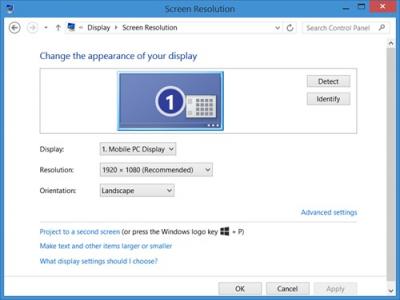
    2. Under Resolution, move the slider to the resolution you want, and then click Apply.


    If you still face any issue, feel free to contact us again.

    Thank You!

    Lokesh

    Edit your answer

    Cancel

    Add your comment

    Cancel


Don’t find the answer?

Feel free to ask our experts from around the world and to receive professional answers for it.

Ask your question

Community login

x

You must login to participate in the Community area. Creating an account is quick and easy

Join the community!

x
Minimum 8 characters.

Thank you for registering

x

We have sent a verification email to the email address you have specified.


After verifying your email address you will be able to log into the community area.
